Reusable PlantUML Components: Modular Diagram Architecture and Shared Styling
Today, we will explore how to create reusable PlantUML components for modular diagram architecture and shared styling across multiple diagrams. This approach allows you to maintain consistency and reduce duplication in your PlantUML diagrams.
1. Database ERD Examples: Music Domain
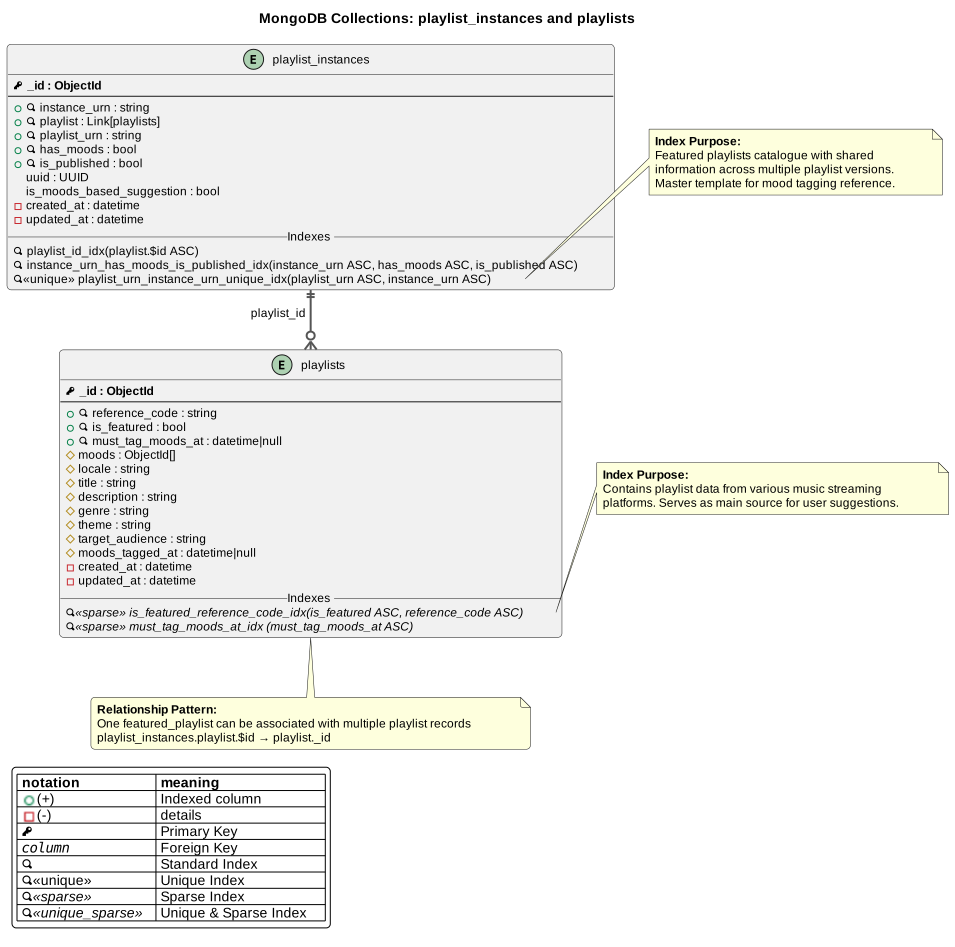
The database/ directory contains a complete example of MongoDB Entity Relationship Diagrams modeling a music
streaming recommendation system. These examples demonstrate:
- Modular diagram architecture with reusable components
- Subsection inclusion using
!includesuband!startsub - Shared styling across multiple diagrams
- JSON data structures within PlantUML diagrams
1.1. Entity Collections
The music database example includes the following collections:
| File | Description |
|---|---|
music-db-Playlists_Collections_ERD.puml | Playlist catalog and published playlist instances |
music-db-Moods_Collections_ERD.puml | Music mood taxonomy and user taste preferences |
music-db-Suggestions_Collections_ERD.puml | Playlist suggestion engine based on user moods |
music-db-Logs.puml | API usage logs for AI-generated playlist metadata |
music-db-All_collections.puml | Master diagram combining all collections |
db_theme_standard.puml | Reusable theme providing consistent styling |
1.2. Business Logic Flow
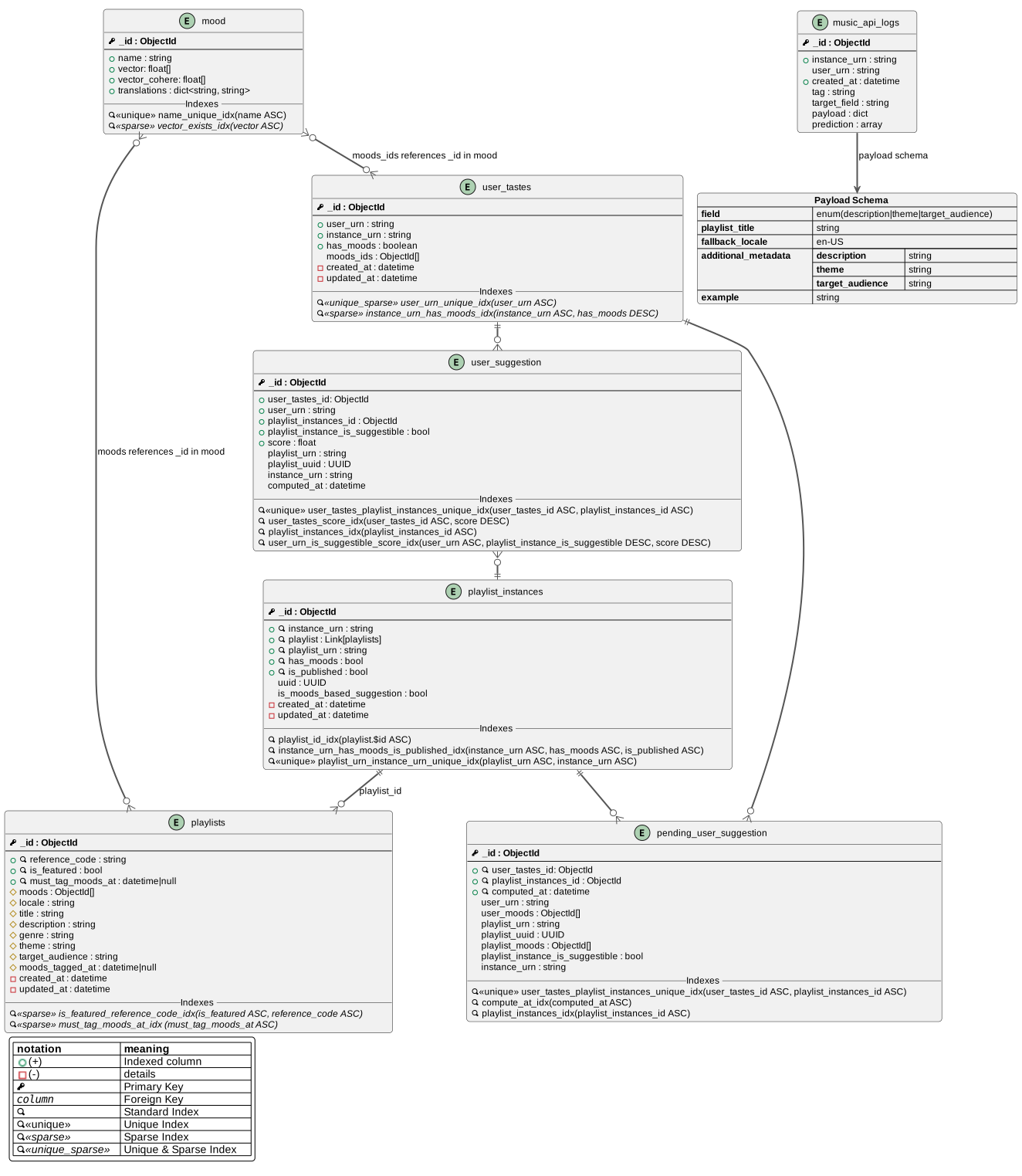
- Playlists are tagged with moods (e.g., “energetic”, “chill”, “melancholic”)
- Users express music preferences through user_tastes (preferred moods)
- The suggestion engine matches playlists to users based on mood similarity
- Vector embeddings enable semantic matching between user tastes and playlist moods
1.3. Complete Database Schema Overview
The following diagram shows all collections and their relationships:
View PlantUML source code
@startuml
!pragma layout smetana
!include content/docs/howtos/how-to-write-plantuml/database/db_theme_standard.puml
!includesub content/docs/howtos/how-to-write-plantuml/database/music-db-Playlists_Collections_ERD.puml!PLAYLIST_MODEL
!includesub content/docs/howtos/how-to-write-plantuml/database/music-db-Playlists_Collections_ERD.puml!PLAYLIST_MODEL_DETAILS
!includesub content/docs/howtos/how-to-write-plantuml/database/music-db-Playlists_Collections_ERD.puml!PLAYLIST_INSTANCES_MODEL
!includesub content/docs/howtos/how-to-write-plantuml/database/music-db-Playlists_Collections_ERD.puml!PLAYLIST_INSTANCES_MODEL_DETAILS
!includesub content/docs/howtos/how-to-write-plantuml/database/music-db-Moods_Collections_ERD.puml!MODEL_USER_TASTES
!includesub content/docs/howtos/how-to-write-plantuml/database/music-db-Moods_Collections_ERD.puml!MODEL_USER_TASTES_DETAILS
!includesub content/docs/howtos/how-to-write-plantuml/database/music-db-Moods_Collections_ERD.puml!MODEL_MOOD
!includesub content/docs/howtos/how-to-write-plantuml/database/music-db-Moods_Collections_ERD.puml!MODEL_MOOD_DETAILS
!includesub content/docs/howtos/how-to-write-plantuml/database/music-db-Suggestions_Collections_ERD.puml!MODEL_PENDING_USER_SUGGESTION
!includesub content/docs/howtos/how-to-write-plantuml/database/music-db-Suggestions_Collections_ERD.puml!MODEL_PENDING_USER_SUGGESTION_DETAILS
!includesub content/docs/howtos/how-to-write-plantuml/database/music-db-Suggestions_Collections_ERD.puml!MODEL_USER_SUGGESTION
!includesub content/docs/howtos/how-to-write-plantuml/database/music-db-Suggestions_Collections_ERD.puml!MODEL_USER_SUGGESTION_DETAILS
!includesub content/docs/howtos/how-to-write-plantuml/database/music-db-Logs.puml!MODEL_MUSIC_API_LOGS
@enduml
2. Reusable Styling with db_theme_standard.puml
The db_theme_standard.puml file is a standalone, reusable theme definition that ensures visual consistency across
all database diagrams.
2.1. Why Separate Styling?
Separating styling from content provides several benefits:
- Single source of truth for visual standards
- Easy updates - change once, apply everywhere
- Reduced duplication - no need to copy/paste styling rules
- Clear separation between diagram content and presentation
2.2. What It Defines
The reusable theme file defines:
!include content/docs/howtos/how-to-write-plantuml/database/db_theme_standard.puml
- Visual styling: fonts, colors, line styles, rounded corners
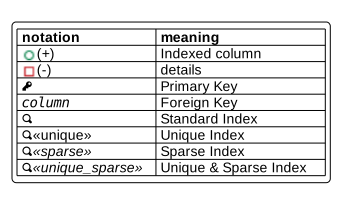
- Notation macros:
PK(primary key),FK(foreign key),IDX(index) - Index types:
UNIQUE,SPARSE,UNIQUE_SPARSE - Legend symbols: explaining all notation used in diagrams
Here’s what the theme styling looks like:
View theme source code
@startuml
' ==============================================
' MongoDB Database Diagram Standard Theme
' ==============================================
' This is a REUSABLE style definition file that provides:
' - Consistent visual styling across all database diagrams
' - Standard notation for database elements (PK, FK, indexes)
' - Color-coded legends for different entity types
' - Icon definitions for database constraints
'
' USAGE: Include this file in any database ERD diagram:
'   !include path/to/db_theme_standard.puml
'
' This ensures all diagrams share the same professional appearance
' and use consistent notation conventions.
' ==============================================

skinparam {
    defaultFontName Arial
    defaultFontSize 12
    roundCorner 8
    packageStyle rectangle
    linetype ortho
    BackgroundColor #FFF
    shadowing false
    ArrowColor #555555
    ArrowThickness 2

    entity {
        Margin 20
    }
}

!define ENTITY entity
!define PK <&key><u><b>
!define FK <u><i>
!define IDX <&magnifying-glass>
!define UNIQUE <u><&magnifying-glass><<unique>>
!define SPARSE <i><&magnifying-glass><<sparse>>
!define UNIQUE_SPARSE <u><i><&magnifying-glass><<unique_sparse>>
!define DETAILS -

legend
|= |= Type |
|<back:#FF0000>   </back>| Type A class |
|<back:#00FF00>   </back>| Type B class |
|<back:blue>   </back>| Type C class |
endlegend

legend left
  |= notation |= meaning|
  | <img : https://cdn-0.plantuml.com/public-field.png{scale=1.4}>(+)  | Indexed column  |
  | <img : https://cdn-0.plantuml.com/private-field.png{scale=1.4}>(-) | details |
  | ""<&key>"" | Primary Key |
  | ""<u><i>column"" | Foreign Key |
  | ""<&magnifying-glass>"" | Standard Index |
  | UNIQUE | Unique Index |
  | SPARSE | Sparse Index |
  | UNIQUE_SPARSE | Unique & Sparse Index |
endlegend

@enduml
2.3. Usage Pattern
Every database ERD diagram includes this file:
@startuml
!include content/docs/howtos/how-to-write-plantuml/database/db_theme_standard.puml

ENTITY users {
  PK _id : ObjectId
  --
  + IDX email : string
}
@enduml
This pattern ensures all diagrams share professional, consistent notation.
3. Modular Composition with !startsub and !includesub
PlantUML supports subsection extraction, allowing you to define reusable diagram fragments that can be included selectively in other diagrams.
3.1. Defining Subsections: !startsub
Use !startsub and !endsub to mark reusable sections:
' Define a reusable playlist entity
!startsub PLAYLIST_MODEL
ENTITY playlists {
  PK _id : ObjectId
  + IDX reference_code : string
}
!endsub

' Define additional detail fields
!startsub PLAYLIST_MODEL_DETAILS
ENTITY playlists {
  # moods : ObjectId[]
  # title : string
  - created_at : datetime
}
!endsub
3.2. Including Subsections: !includesub
Use !includesub to import specific subsections into another diagram:
@startuml
!include db_theme_standard.puml

' Include only the core playlist model (without details)
!includesub music-db-Playlists_Collections_ERD.puml!PLAYLIST_MODEL

@enduml
3.3. Benefits of Subsection Inclusion
- Selective composition - include only what you need
- Multiple levels of detail - show high-level or detailed views
- Avoid duplication - define entities once, reuse everywhere
- Maintainability - update the source, all diagrams reflect changes
3.4. Example: Cross-Diagram References
In music-db-Moods_Collections_ERD.puml:
package "Playlist Collections" <<Only the relevant fields are shown>> #LightGray {
  !includesub content/docs/howtos/how-to-write-plantuml/database/music-db-Playlists_Collections_ERD.puml!PLAYLIST_MODEL
}
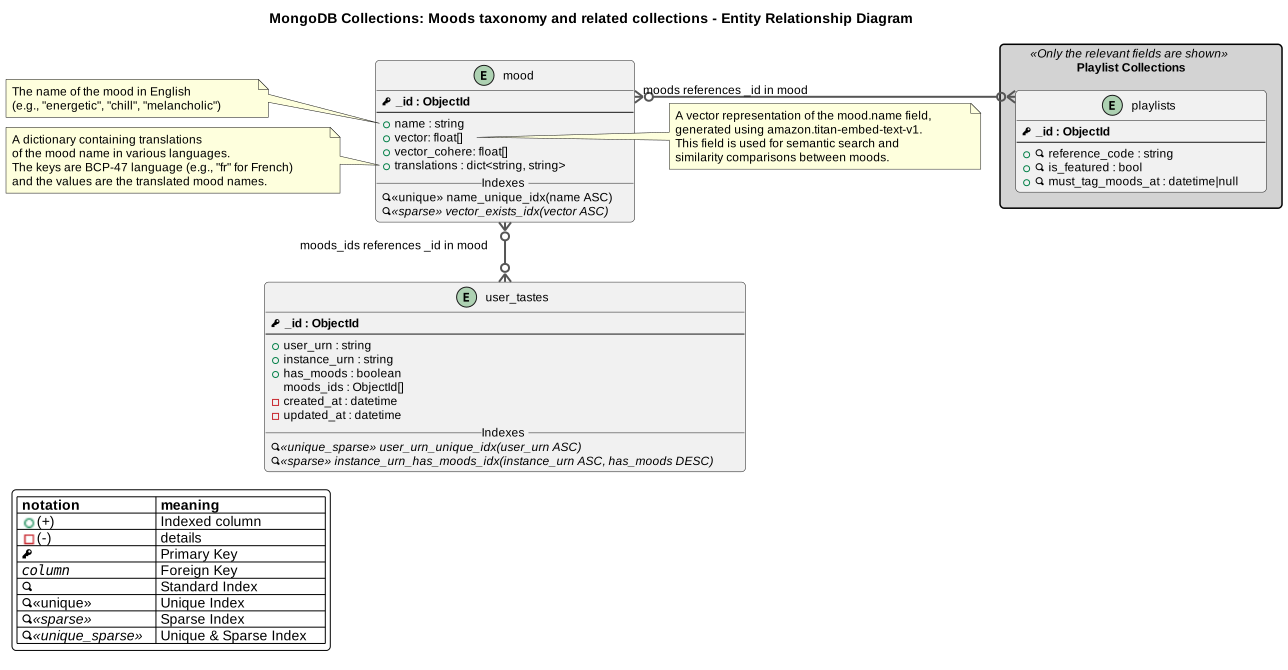
This imports the playlists entity definition without duplicating code, showing how moods relate to playlists.
3.4.1. Example Diagrams
Playlists Collections:
View PlantUML source code
@startuml Playlists Collections - Entity Relationship Diagram

title MongoDB Collections: playlist_instances and playlists

!include content/docs/howtos/how-to-write-plantuml/database/db_theme_standard.puml

' PLAYLIST_MODEL
!startsub PLAYLIST_MODEL
ENTITY playlists {
  PK _id : ObjectId
  --
  + IDX reference_code : string
  + IDX is_featured : bool
  + IDX must_tag_moods_at : datetime|null
}
!endsub

!startsub PLAYLIST_MODEL_DETAILS
ENTITY playlists {
  # moods : ObjectId[]
  # locale : string
  # title : string
  # description : string
  # genre : string
  # theme : string
  # target_audience : string
  # moods_tagged_at : datetime|null
  - created_at : datetime
  - updated_at : datetime
  __Indexes__
  SPARSE is_featured_reference_code_idx(is_featured ASC, reference_code ASC)
  SPARSE must_tag_moods_at_idx (must_tag_moods_at ASC)
}
!endsub

' PLAYLIST_INSTANCES_MODEL
!startsub PLAYLIST_INSTANCES_MODEL

ENTITY playlist_instances {
  PK _id : ObjectId
  --
  + IDX instance_urn : string
  + IDX playlist : Link[playlists]
  + IDX playlist_urn : string
  + IDX has_moods : bool
  + IDX is_published : bool
}

' Relationships
playlist_instances ||--o{ playlists : "playlist_id"

!endsub

!startsub PLAYLIST_INSTANCES_MODEL_DETAILS
ENTITY playlist_instances {
uuid : UUID
is_moods_based_suggestion : bool
-created_at : datetime
-updated_at : datetime
__Indexes__
IDX playlist_id_idx(playlist.$id ASC)
IDX instance_urn_has_moods_is_published_idx(instance_urn ASC, has_moods ASC, is_published ASC)
UNIQUE playlist_urn_instance_urn_unique_idx(playlist_urn ASC, instance_urn ASC)
}
!endsub


note right of playlists::is_featured_reference_code_idx
  **Index Purpose:**
  Contains playlist data from various music streaming
  platforms. Serves as main source for user suggestions.
end note

note right of playlist_instances::playlist_urn_instance_urn_unique_idx
  **Index Purpose:**
  Featured playlists catalogue with shared
  information across multiple playlist versions.
  Master template for mood tagging reference.
end note

note bottom of playlists
  **Relationship Pattern:**
  One featured_playlist can be associated with multiple playlist records
  playlist_instances.playlist.$id → playlist._id
end note

@enduml
Moods Collections:
View PlantUML source code
@startuml Moods Collections - Entity Relationship Diagram

title MongoDB Collections: Moods taxonomy and related collections - Entity Relationship Diagram

!include content/docs/howtos/how-to-write-plantuml/database/db_theme_standard.puml


package "Playlist Collections" <<Only the relevant fields are shown>> #LightGray {
  !includesub content/docs/howtos/how-to-write-plantuml/database/music-db-Playlists_Collections_ERD.puml!PLAYLIST_MODEL
}
!startsub MODEL_USER_TASTES
ENTITY user_tastes {
  PK _id : ObjectId
  --
  + user_urn : string
  + instance_urn : string
  + has_moods : boolean
  moods_ids : ObjectId[]
}
!endsub

!startsub MODEL_USER_TASTES_DETAILS
ENTITY user_tastes {
DETAILS created_at : datetime
DETAILS updated_at : datetime
__Indexes__
UNIQUE_SPARSE user_urn_unique_idx(user_urn ASC)
SPARSE instance_urn_has_moods_idx(instance_urn ASC, has_moods DESC)
}
!endsub

!startsub MODEL_MOOD
ENTITY mood {
PK _id : ObjectId
--
+ name : string
+ vector: float[]
+ vector_cohere: float[]
+ translations : dict<string, string>
}
!endsub

!startsub MODEL_MOOD_DETAILS
ENTITY mood {
__Indexes__
UNIQUE name_unique_idx(name ASC)
SPARSE vector_exists_idx(vector ASC)
}
' Relationships
mood }o--o{ user_tastes : "moods_ids references _id in mood"
mood }o-r-o{ playlists : "moods references _id in mood"
!endsub

note left of mood::name
  The name of the mood in English
  (e.g., "energetic", "chill", "melancholic")
end note
note left of mood::translations
  A dictionary containing translations
  of the mood name in various languages.
  The keys are BCP-47 language (e.g., "fr" for French)
  and the values are the translated mood names.
end note
note right of mood::vector
  A vector representation of the mood.name field,
  generated using amazon.titan-embed-text-v1.
  This field is used for semantic search and
  similarity comparisons between moods.
end note

@enduml
Suggestions Collections:
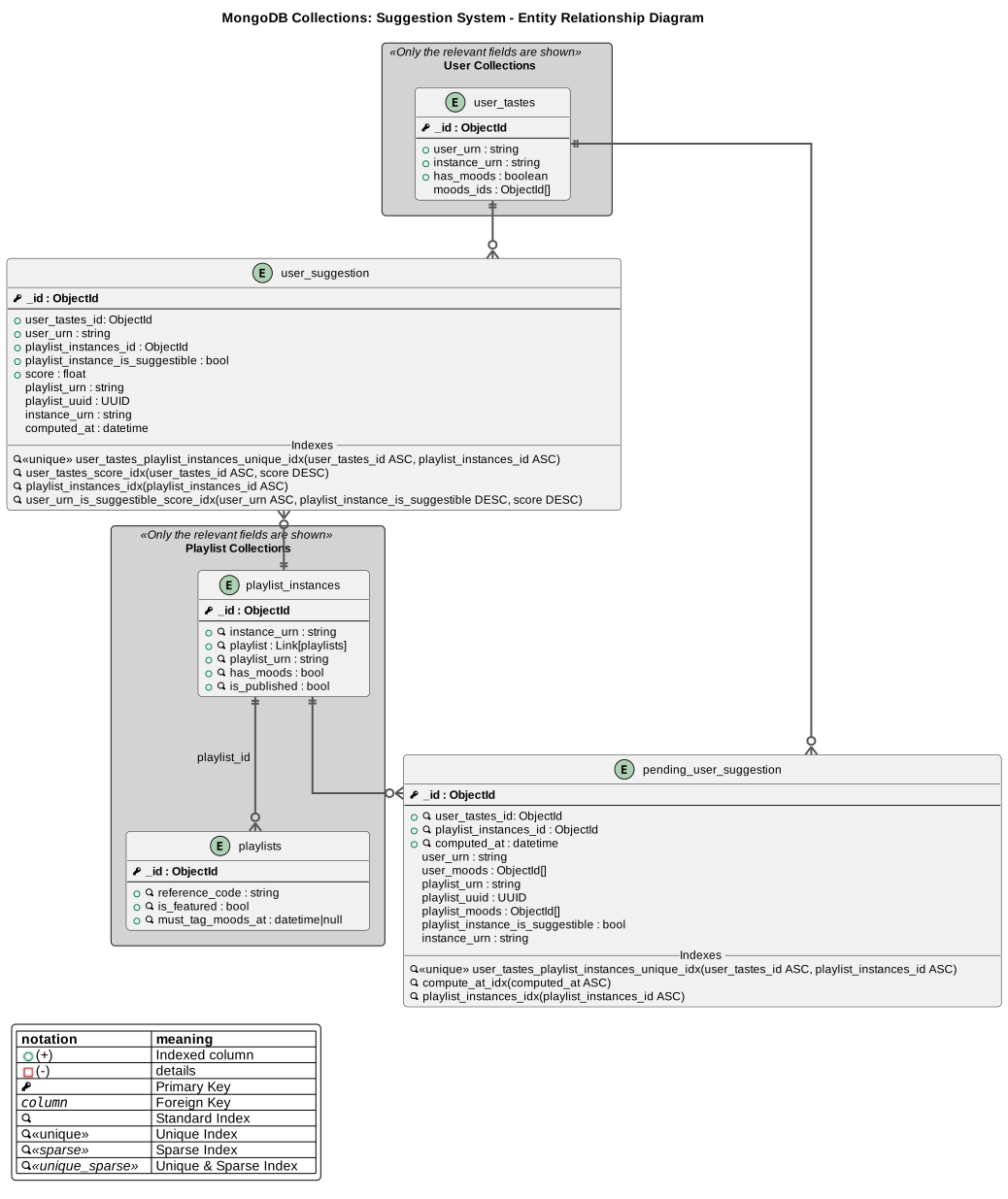
View PlantUML source code
@startuml Suggestions Collections - Entity Relationship Diagram

title MongoDB Collections: Suggestion System - Entity Relationship Diagram
!include content/docs/howtos/how-to-write-plantuml/database/db_theme_standard.puml

package "Playlist Collections" <<Only the relevant fields are shown>> as PC #LightGray {
  !includesub content/docs/howtos/how-to-write-plantuml/database/music-db-Playlists_Collections_ERD.puml!PLAYLIST_MODEL
  !includesub content/docs/howtos/how-to-write-plantuml/database/music-db-Playlists_Collections_ERD.puml!PLAYLIST_INSTANCES_MODEL
}

package "User Collections" <<Only the relevant fields are shown>> as UC #LightGray{
  !includesub content/docs/howtos/how-to-write-plantuml/database/music-db-Moods_Collections_ERD.puml!MODEL_USER_TASTES
}

!startsub MODEL_PENDING_USER_SUGGESTION
ENTITY pending_user_suggestion {
  PK _id : ObjectId
  --
  + IDX user_tastes_id: ObjectId
  + IDX playlist_instances_id : ObjectId
  + IDX computed_at : datetime
  user_urn : string
  user_moods : ObjectId[]
  playlist_urn : string
  playlist_uuid : UUID
  playlist_moods : ObjectId[]
  playlist_instance_is_suggestible : bool
  instance_urn : string
}
!endsub

!startsub MODEL_PENDING_USER_SUGGESTION_DETAILS
ENTITY pending_user_suggestion {
  __Indexes__
  UNIQUE user_tastes_playlist_instances_unique_idx(user_tastes_id ASC, playlist_instances_id ASC)
  IDX compute_at_idx(computed_at ASC)
  IDX playlist_instances_idx(playlist_instances_id ASC)
}
!endsub

!startsub MODEL_USER_SUGGESTION
ENTITY user_suggestion {
  PK _id : ObjectId
  --
  +user_tastes_id: ObjectId
  +user_urn : string
  +playlist_instances_id : ObjectId
  +playlist_instance_is_suggestible : bool
  +score : float
  playlist_urn : string
  playlist_uuid : UUID
  instance_urn : string
  computed_at : datetime
}

' Relationships
user_tastes ||--o{ pending_user_suggestion
playlist_instances ||--o{ pending_user_suggestion
user_tastes ||-d-o{ user_suggestion
playlist_instances ||-u-o{ user_suggestion

!endsub

!startsub MODEL_USER_SUGGESTION_DETAILS
ENTITY user_suggestion {
  __Indexes__
  UNIQUE user_tastes_playlist_instances_unique_idx(user_tastes_id ASC, playlist_instances_id ASC)
  IDX user_tastes_score_idx(user_tastes_id ASC, score DESC)
  IDX playlist_instances_idx(playlist_instances_id ASC)
  IDX user_urn_is_suggestible_score_idx(user_urn ASC, playlist_instance_is_suggestible DESC, score DESC)
}
!endsub
@enduml
4. Master Diagram: music-db-All_collections.puml
The music-db-All_collections.puml file demonstrates diagram composition by combining all subsections into a complete database schema view.
4.1. How It Works
@startuml
!pragma layout smetana
!include content/docs/howtos/how-to-write-plantuml/database/db_theme_standard.puml

' Include playlist entities
!includesub content/docs/howtos/how-to-write-plantuml/database/music-db-Playlists_Collections_ERD.puml!PLAYLIST_MODEL
!includesub content/docs/howtos/how-to-write-plantuml/database/music-db-Playlists_Collections_ERD.puml!PLAYLIST_MODEL_DETAILS

' Include mood entities
!includesub content/docs/howtos/how-to-write-plantuml/database/music-db-Moods_Collections_ERD.puml!MODEL_MOOD
!includesub content/docs/howtos/how-to-write-plantuml/database/music-db-Moods_Collections_ERD.puml!MODEL_MOOD_DETAILS

' ... and so on for all collections
@enduml
4.2. Advantages
- Single comprehensive view of the entire database
- No code duplication - entities defined once in source files
- Automatic updates - changes propagate from source diagrams
- Flexible composition - easily add/remove collections
This pattern is perfect for creating both detailed individual diagrams and high-level overview diagrams from the same source.
4.2.1. Master Diagram View
View complete PlantUML source code
@startuml
!pragma layout smetana
!include content/docs/howtos/how-to-write-plantuml/database/db_theme_standard.puml
!includesub content/docs/howtos/how-to-write-plantuml/database/music-db-Playlists_Collections_ERD.puml!PLAYLIST_MODEL
!includesub content/docs/howtos/how-to-write-plantuml/database/music-db-Playlists_Collections_ERD.puml!PLAYLIST_MODEL_DETAILS
!includesub content/docs/howtos/how-to-write-plantuml/database/music-db-Playlists_Collections_ERD.puml!PLAYLIST_INSTANCES_MODEL
!includesub content/docs/howtos/how-to-write-plantuml/database/music-db-Playlists_Collections_ERD.puml!PLAYLIST_INSTANCES_MODEL_DETAILS
!includesub content/docs/howtos/how-to-write-plantuml/database/music-db-Moods_Collections_ERD.puml!MODEL_USER_TASTES
!includesub content/docs/howtos/how-to-write-plantuml/database/music-db-Moods_Collections_ERD.puml!MODEL_USER_TASTES_DETAILS
!includesub content/docs/howtos/how-to-write-plantuml/database/music-db-Moods_Collections_ERD.puml!MODEL_MOOD
!includesub content/docs/howtos/how-to-write-plantuml/database/music-db-Moods_Collections_ERD.puml!MODEL_MOOD_DETAILS
!includesub content/docs/howtos/how-to-write-plantuml/database/music-db-Suggestions_Collections_ERD.puml!MODEL_PENDING_USER_SUGGESTION
!includesub content/docs/howtos/how-to-write-plantuml/database/music-db-Suggestions_Collections_ERD.puml!MODEL_PENDING_USER_SUGGESTION_DETAILS
!includesub content/docs/howtos/how-to-write-plantuml/database/music-db-Suggestions_Collections_ERD.puml!MODEL_USER_SUGGESTION
!includesub content/docs/howtos/how-to-write-plantuml/database/music-db-Suggestions_Collections_ERD.puml!MODEL_USER_SUGGESTION_DETAILS
!includesub content/docs/howtos/how-to-write-plantuml/database/music-db-Logs.puml!MODEL_MUSIC_API_LOGS
@enduml
5. JSON Data Structures in PlantUML
PlantUML supports embedding JSON notation directly in diagrams, useful for documenting:
- API request/response structures
- Database document schemas (MongoDB)
- Configuration examples
- Data transformation flows
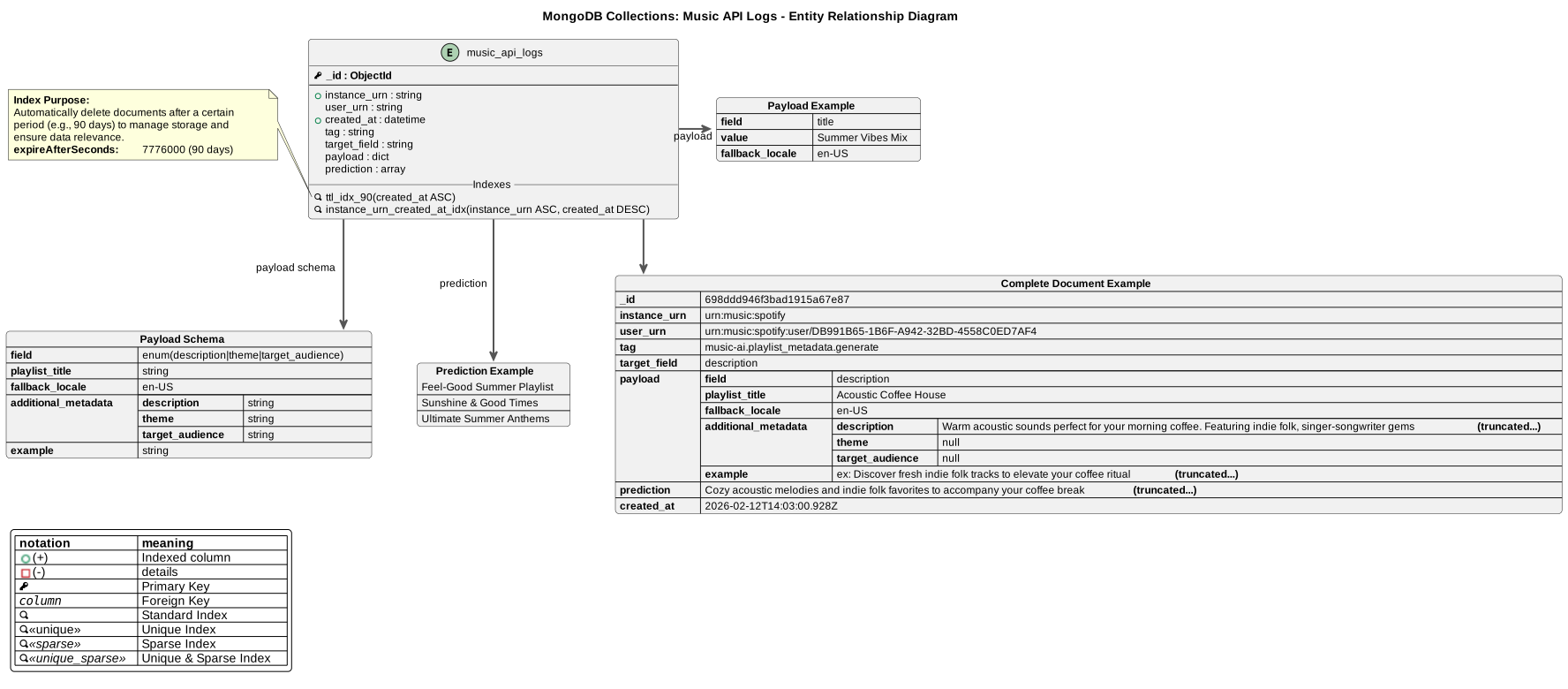
5.1. Example from music-db-Logs.puml
json payload as "**Payload Example**" {
  "**field**": "title",
  "**value**": "Summer Vibes Mix",
  "**fallback_locale**": "en-US"
}
music_api_logs -r-> payload: payload
This creates a formatted JSON box linked to an entity, showing exactly what data structure is used.
5.2. Complete Document Example
The logs diagram also shows a complete MongoDB document:
json complete_example as "**Complete Document Example**" {
    "**_id**": "698ddd946f3bad1915a67e87",
    "**instance_urn**": "urn:music:spotify",
    "**user_urn**": "urn:music:spotify:user/...",
    "**tag**": "music-ai.playlist_metadata.generate",
    "**payload**": {
        "**field**": "description",
        "**playlist_title**": "Acoustic Coffee House",
        "**additional_metadata**": { "..." }
    },
    "**prediction**": ["..."]
}
5.3. Benefits
- Precise schema documentation alongside ERD diagrams
- Visual clarity - readers see exact data structures
- Version control - schema examples tracked with diagrams
- Testing reference - developers can use examples for test data
5.4. Complete Logs Diagram Example
Here’s the complete logs diagram showing JSON structures and their relationships:
View PlantUML source code
@startuml

title MongoDB Collections: Music API Logs - Entity Relationship Diagram
!include content/docs/howtos/how-to-write-plantuml/database/db_theme_standard.puml

!startsub MODEL_MUSIC_API_LOGS
ENTITY music_api_logs {
  PK _id : ObjectId
  --
  + instance_urn : string
  user_urn : string
  + created_at : datetime
  tag : string
  target_field : string
  payload : dict
  prediction : array
}

json payload_schema as "**Payload Schema**" {
  "**field**": "enum(description|theme|target_audience)",
  "**playlist_title**": "string",
  "**fallback_locale**": "en-US",
  "**additional_metadata**": {
    "**description**": "string",
    "**theme**": "string",
    "**target_audience**": "string"
  },
  "**example**": "string"
}
music_api_logs --> payload_schema: payload schema

!endsub

!startsub MODEL_MUSIC_API_LOGS_DETAILS
ENTITY music_api_logs {
  __Indexes__
  IDX ttl_idx_90(created_at ASC)
  IDX instance_urn_created_at_idx(instance_urn ASC, created_at DESC)
}

note left of music_api_logs::ttl_idx_90
  **Index Purpose:**
  Automatically delete documents after a certain
  period (e.g., 90 days) to manage storage and
  ensure data relevance.
  **expireAfterSeconds:**  7776000 (90 days)
end note

json payload as "**Payload Example**" {
  "**field**": "title",
  "**value**": "Summer Vibes Mix",
  "**fallback_locale**": "en-US"
}
music_api_logs -r-> payload: payload

json prediction as "**Prediction Example**" {
  [
    "Feel-Good Summer Playlist",
    "Sunshine & Good Times",
    "Ultimate Summer Anthems"
  ]
}
music_api_logs -d-> prediction: prediction

json complete_example as "**Complete Document Example**" {
    "**_id**": "698ddd946f3bad1915a67e87",
    "**instance_urn**": "urn:music:spotify",
    "**user_urn**": "urn:music:spotify:user/DB991B65-1B6F-A942-32BD-4558C0ED7AF4",
    "**tag**": "music-ai.playlist_metadata.generate",
    "**target_field**": "description",
    "**payload**": {
        "**field**": "description",
        "**playlist_title**": "Acoustic Coffee House",
        "**fallback_locale**": "en-US",
        "**additional_metadata**": {
            "**description**": "Warm acoustic sounds perfect for your morning coffee. Featuring indie folk, singer-songwriter gems **(truncated...)**",
            "**theme**": null,
            "**target_audience**": null
        },
        "**example**": "ex: Discover fresh indie folk tracks to elevate your coffee ritual **(truncated...)**"
    },
    "**prediction**": [
      "Cozy acoustic melodies and indie folk favorites to accompany your coffee break **(truncated...)**"
    ],
    "**created_at**": "2026-02-12T14:03:00.928Z"
}
music_api_logs --> complete_example


!endsub
@enduml